Tuesday, July 9, 2013

schedule computer to shut down at a certain time

Hi ,

If using Windows 7, follow these steps to schedule your PC(Personal Computer) to shut down at a certain time at night:

1. Go to Start > Control Panel > System and Security > Administrative Tools and click on the Task Scheduler.
 
2. From the Action menu in Task Scheduler, click "Create Basic Task..."
 
3. In the "Create Basic Task Wizard" windows that pops up, Type in a title and a description. Something basic like "PC Shutdown."
 
4. Click "Next."
 
5. On the "Task Trigger" screen, choose the frequency with which you want the Shutdown PC to run. For nightly shutdown, click on "daily" and click the Next" button.
 
6.On the "Daily" screen, enter the date and time you want your PC to shutdown. Click "Next."
 
7. On the "Action" screen, choose "Start a program" and click "Next."
 
8. On the "Start a Program" screen, type C:\Windows\System32\shutdown.exe in the "Program/script" text field.
 
9. In the Add arguments text field type /s.
 
10. Click "Next."
 
11. Confirm your settings on the Summary screen and click "Finish."
 
Now your Windows 7 computer will automatically shutdown at the same time every day/night.

Android's Jelly Bean surpasses Gingerbread for the first time

Data collected during a 14-day period ending on July 8, 2013.
(Credit: Google)
Android's Jelly Bean operating system has finally toppled the older and uber-popular Gingerbread. According to Android usage data that Google released Monday, Jelly Bean now has 37.9 percent adoption and Gingerbread has 34.1 percent.
This is an increase of 4.9 percentage points for Jelly Bean since last month. In June, Jelly Bean had 33 percent usage and Gingerbread had 36.5 percent. The new data reflects usage from the 14-day period ending on July 8.
While Jelly Bean is now the most popular OS for Android, users are still split between versions 4.1 and 4.2. By far, more users are on Jelly Bean 4.1 with 32.3 percent. Only 5.6 percent of people are currently using Jelly Bean 4.2.
As far as the other operating systems on Android, Ice Cream Sandwich now has 23.3 percent, which is a drop from 25.6 percent last month. Jelly Bean overtook Ice Cream Sandwich for the first time in May. The numbers for Donut, Eclair, Froyo, and Honeycomb are pretty low at this point -- their combined usage is less than 5 percent.
In April, Google began counting data a little bit differently. Previously, devices were counted when they checked into Google's servers. But the company is now collecting data when users visit the Google Play Store. The company says this way of counting data more accurately reflects users "who are most engaged in the Android and Google Play ecosystem."
The driving force behind the growth in Jelly Bean seems to be Samsung's Galaxy S3 and S4, which have sold millions of units in the past year. Gingerbread, released in 2010, is the operating system that's typically used on less-expensive phones. It's looking like Jelly Bean will now just continue to grow with the integration of newer high-powered devices.

Nokia Lumia 1020 with 41-megapixel camera confirmed

Nokia Lumia 1020 sample photo
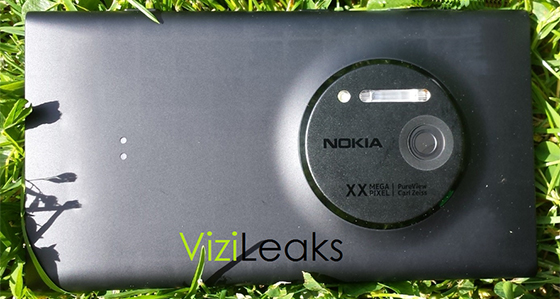
Nokia's 41-megapixel Windows Phone will be called the Nokia Lumia 1020. That's according to sample photos posted on Flickr by Microsoft Windows Phone manager Joe Belfiore. In a series of sample shots from various Lumia Windows Phones, there are two that appear as "Nokia Lumia 1020." One is listed at 2947 x 1658 resolution (nearly 5-megapixels) and another is 2352 x 1568 (3.7-megapixels), suggesting that Nokia's upcoming Lumia 1020 PureView will likely shoot at different resolutions using the power of the large sensor.
Nokiaeosleakvizileaks
There had been some confusion over the name of Nokia's 41-megapixel Windows Phone, initially identified as the Lumia 1020 and then the Nokia 909. Although EXIF and Flickr data can occasionally be faked and rendered inaccurate, it's highly unlikely that Belfiore has faked an image on his own personal Flickr account. Nokia is expected to unveil the device, codenamed EOS, at an event in New York on Thursday along with a special camera grip and battery accessory. Nokia has been teasing the handset under the slogan 

Canvas 4 shows how Micromax gives India the smartphones

Micromax launched its much anticipated Canvas 4 device for Rs 17,999 in New Delhi yesterday, featuring specs like a 13 MP rear camera, 5-inch screen, 1GB RAM and 16 GB internal memory. The phone also runs the latest version of Android Jelly Bean. In addition to the hardware, the Canvas 5 has a number of software features like a ‘blow to unlock’ feature. You can read more on the specs of the phone here.
We caught up with Micromax CEO Deepak Mehrotra after the launch and he spoke to us about the Canvas 4, how Micromax has its eye on the number one smartphone spot in India’s market and the company’s plans for its next smartphone, the Canvas 5.
How is the Canvas 4 different from the previous phones in the Canvas series in terms of software and value add?
The way we look at our customers is we keep microsegmenting it.
Why make a customer pay for a full fledged buffet with 500 dishes when they need only five. So that’s where you need to understand the customer’s specific need and rather than create an omnibus product, you create a product where the specific need of the customer gets addressed.
The Canvas 4: Image by Tech 2
So Canvas 2 was targeted at an entry to mid segment smartphone user. It met most needs but the customer was left wanting a little more. HD was a step ahead. Now we significantly raised the bar further up so you have a Canvas 4 with a 13 MP rear camera and a 5 MP front camera. These are times of user generated content and the better the camera, the more professional the image you are able to create – so the better off you are. That’s a big change. Very clearly, on the hardware front, there’s a substantial upside.
Because we have raised the bar on the hardware, now we can pack in a lot more applications to the device — so we are making life easier. So, you can manage your life as you want it, on the go. You just need to have a good connection to do it swiftly. As a full fledged device, Canvas 4 allows you musti-tasking, it allows you video pinning or multiple video browsing. On photography I would rate it among the beVest devices you could possibly have.